
See which Claude Code account still has room.
Headroom is a free menu bar app for Mac. It shows the session and weekly limits for every Claude Code account you are signed in to: which ones you can use right now, and when each of the others comes back.
Free for everyone. No account, no trial, no ads, no paid version.
Version 1.1, 1.1 MB. macOS 13 or later, Apple silicon and Intel. Signed and notarized by Apple. An independent app, not made or endorsed by Anthropic.
3 of 4 accounts usable now · average session use 52%
The accounts are made up. The panel works: the countdowns run from the moment you opened this page, and an account opens when you click it.
A day with four accounts
Four moments from one working day, and what Headroom said at each of them.
-
9:05 AM
4 of 4 accounts usable now · average session use 5%
work@example.comReadySession12%Week64%Fable47%Everything is ready
A green dot and the word Ready: nothing on this account is used up. The small meters show the session, the week, and a weekly limit for one model when the account has one.
-
12:20 PM
4 of 4 accounts usable now · average session use 38%
work@example.com7% of session leftSession93%Week71%Fable54%The work account is nearly out
Past 90%, the bar turns red and the status says how much of the session is left. Finish the task in hand, or plan the switch before Claude Code stops.
-
1:10 PM
3 of 4 accounts usable now · average session use 52%
maya@example.comReadySession42%Week61%Fable48%work@example.comBack in 38mSession100%Week72%Fable55%Work is used up. Maya is ready.
A red dot means the account cannot be used right now, and the status counts down to when it can. The first line says three of the four still work, so you switch to one of them and carry on.
-
4:40 PM
4 of 4 accounts usable now · average session use 31%
client@example.comFable back in 4d 2hSession31%Week62%Fable100%One model is used up on the client account
The dot is half red: the weekly limit for one model has run out, and the account still works with the other models. The work account reset at 1:48 PM and is back to Ready.
Every number is what you have used
Never what is left. The one exception is the status text past 90%, which spells out that it means what is left. Headroom checks every five minutes, and again when you open the panel.
Click an account for the details
Each limit gets its reset time as a countdown and as a clock time, with the plan, the folder and the date the subscription is likely to renew. That date is an estimate from the day the subscription started: right for monthly billing, wrong for annual.
The number in the menu bar
It is the average session use across the accounts you track. The panel's first line says how many accounts you can use right now. A plan with no session limit, such as Ultra, shows only its weekly meters and stays out of the average.
Free for everyone.
Headroom costs nothing, whoever you are and however many accounts you track. It is not a trial, and there is nothing to unlock.
- No trialIt does not stop working after two weeks.
- No accountThere is nothing to sign up for. We never learn who you are.
- No adsNot in the panel, not in the menu bar.
- No paid versionThere is one Headroom, and this is all of it.
- No account limitTrack one Claude Code account or every one you have.
Headroom is made by Everyday Mac Tools, a small studio that sells other Mac apps. This one is free.
Add an account from the panel
With one account there is nothing to set up: Headroom finds the sign-in Claude Code already saved. For another account, choose Add an Account… from the menu at the bottom of the panel. Headroom signs in through Claude Code itself, so Claude Code has to be installed.
-
Give the account a short name
Something like
work. Headroom keeps the account in its own folder,~/.claude-work, the way Claude Code keeps each account. Add the email if you want the sign-in page filled in for you.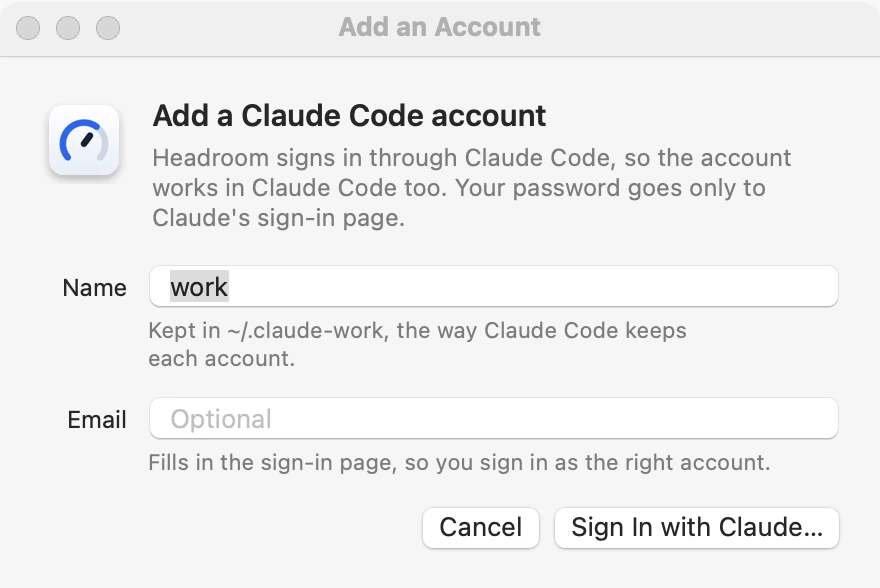
-
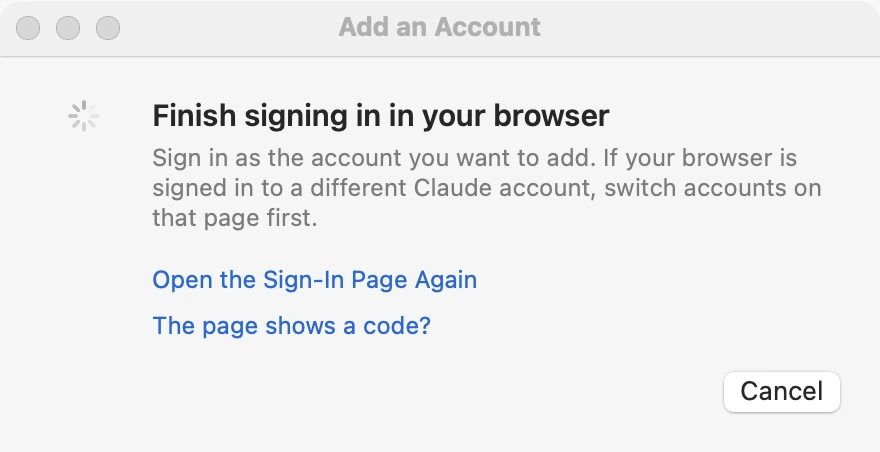
Sign in in your browser
Click Sign In with Claude… and finish on Claude's own sign-in page. If your browser is signed in to a different Claude account, switch accounts on that page first. Your password goes only to that page.
-
The account shows in the panel
That is all Headroom needs. To use the account in Claude Code, start Claude Code with the line the window gives you:
CLAUDE_CONFIG_DIR=~/.claude-work claude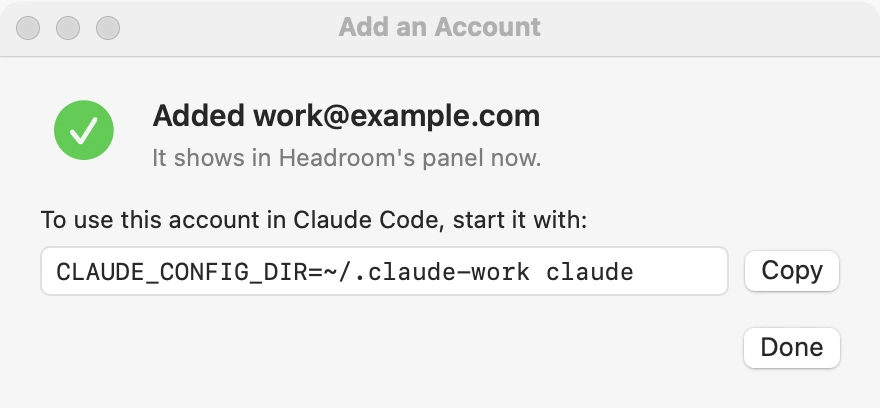
Prefer Terminal?
The old way still works. Start Claude Code with the line above, type /login and sign in. Any folder name works if it starts with .claude- and sits in your home folder. Headroom finds the account within five minutes.
When a sign-in lapses
The account's row shows a Sign In Again… link. It runs the same sign-in for that account, so you do not need Terminal for that either.
Stop tracking an account
Open it in the panel and click Stop Tracking. It stays signed in to Claude Code, and it stays in the panel as a short Not tracked row with a Track Again link.
What it reads and what it sends
Headroom runs on your Mac and talks to Anthropic. We never receive your sign-in, your usage or your email address.
- It reads the sign-in Claude Code saved in your keychain
- That is how it asks for your usage without a password or an API key.
- It talks only to Anthropic's servers for usage
- The requests go straight from your Mac to Anthropic. Nothing about your accounts comes to us.
- It never sends a prompt
- So checking your usage does not use any of your limit.
- It leaves renewing a sign-in to Claude Code
- When a sign-in has gone stale, Headroom asks Claude Code itself to renew it, the same way Claude Code does when you open it.
- It has no analytics and no account
- Once a day it fetches
version.jsonfrom this site to see whether a newer version exists. It tells you if one does. It never installs anything by itself.
The privacy page has the full list.
Questions
Is Headroom made by Anthropic?
No. Headroom is an independent app from Everyday Mac Tools. It is not made, endorsed or supported by Anthropic. Claude and Claude Code are Anthropic's products.
Is it really free?
Yes, fully, for everyone. There is no trial, no account, no ads and no paid version, and you can track any number of accounts.
Where do the numbers come from?
From the same usage figures Claude Code shows when you type /usage. Anthropic does not publish these as an official interface, so a change on their side can break Headroom until we update it. If that happens, the panel says it could not read the numbers. It never guesses.
Does checking usage count against my limits?
No. Headroom only reads the usage numbers. It never sends a prompt.
Does it work with one account?
Yes. You get the same session and weekly limits and reset times, for the one account, with nothing to set up.
Does it work with API keys or the Claude apps?
No. Headroom follows Claude Code accounts on a Pro, Max, Ultra, Team or Enterprise plan that are signed in on this Mac. It does not track API key billing, and it cannot see an account that has never signed in to Claude Code here.
An account says "Sign-in lapsed". What now?
That account's sign-in has fully expired, so sign in again for it. Click the Sign In Again… link in the account's row and finish in your browser. Headroom picks the account up again by itself.
How do I remove it?
Choose Quit Headroom from the menu at the bottom right of the panel, then drag Headroom from Applications to the Trash. It leaves one small cache file of the last numbers in ~/Library/Application Support/Headroom.
Which Macs does it run on?
macOS 13 Ventura or later, on Apple silicon or Intel. The installer is signed and notarized by Apple.
From the blog
Plain guides to Claude Code limits, plans and running several accounts.
-
Claude session limit vs weekly limit: the difference
The session limit resets five hours after you start; the weekly limit resets at a fixed time for your account. They count at once, so you can hit either first.
-
Can you use Fable on the Claude Pro plan?
Yes, but on usage credits, not inside Pro limits. The July 19, 2026 end of the promotion, the Fable 5.2 launch week offer, and the consent prompt in Claude Code.
-
CLAUDE_CONFIG_DIR explained: what it keeps separate
CLAUDE_CONFIG_DIR points Claude Code at a different configuration folder. Here is what lives in it, how the macOS Keychain follows it, and where it is ignored.
-
/compact vs /clear: which saves more of your limit?
/clear costs nothing and starts fresh. /compact summarizes a long chat but reads all of it first. Here is Anthropic's rule of thumb and when each one is right.
-
Claude Code "Server is temporarily limiting requests" explained
This Claude Code message is a short server-side throttle, not your plan limit. What it means, how retries work, and how it differs from 429 and 529 errors.
-
Add a second Claude Code account to Headroom
Add another Claude Code account to Headroom from its menu: name it, sign in with Claude in the browser, and track it. The Terminal route works too.

Download Headroom
Free for everyone. No account, no trial, no ads, no paid version.
Open the downloaded file and follow the installer. Headroom then appears in your menu bar.
Version 1.1, 1.1 MB. macOS 13 or later, Apple silicon and Intel. Signed and notarized by Apple.